Guided Fixes (v1)
Clear, step-by-step instructions to fix issues in your Shopify theme — without Zolvio writing to your live theme.
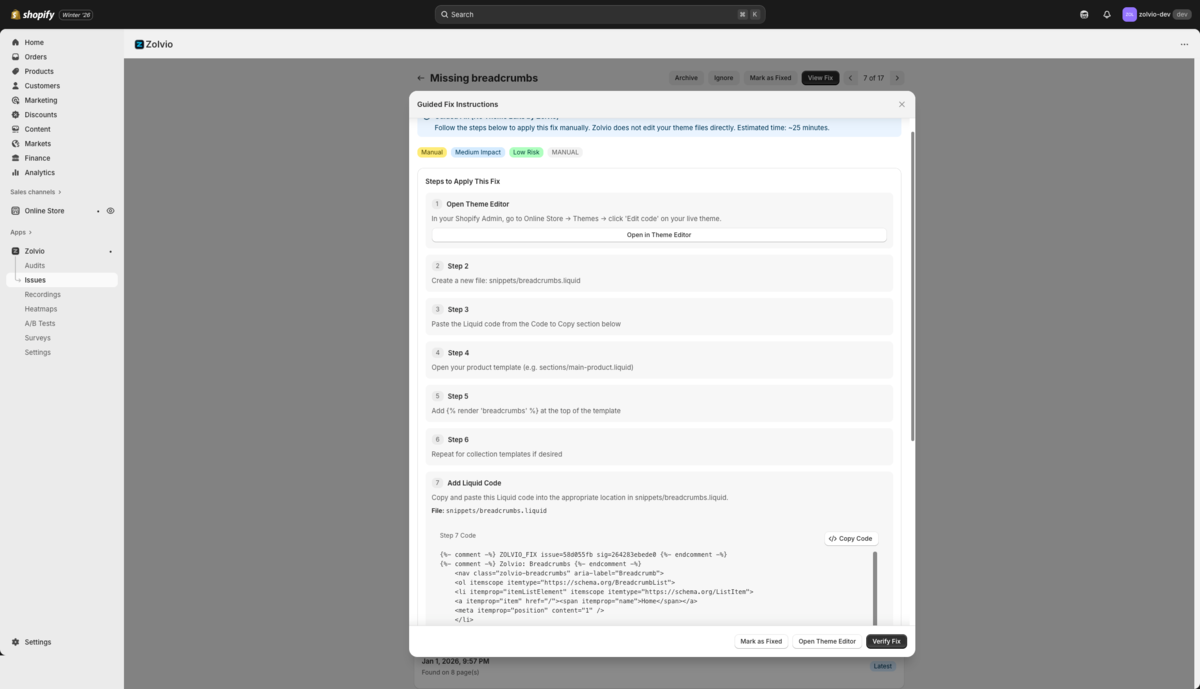
Screenshot placeholder
1200×720px •
/docs-images/guided-fixes/guided-fix-steps-1200x720.pngAdd a file at this path to replace the placeholder.
What “Guided Fixes” Mean
When Zolvio detects an issue, you get:
- A clear explanation of what’s wrong and why it impacts conversion
- Evidence (affected pages, screenshots/metrics when available)
- 3–7 actionable steps that tell you exactly where to change things in Shopify
- Optional snippets (CSS/JS/Liquid) when a copy/paste change is safe
Start from Issues
Guided fixes are attached to issues. See Issues & Fixes for the workflow.
Recommended Workflow
- Run an audit to generate a prioritized Issues list
- Open a high-impact issue (Critical/High first)
- Follow the guided steps in your Theme Editor (or Shopify Settings when applicable)
- Test the change using Shopify’s theme preview (duplicate your theme if you want a safe staging copy)
- Click Verify fix (if available) and then mark the issue as Fixed
- Re-run an audit after major changes to confirm improvement
What You’ll See in a Guided Fix
- Where to change: e.g., “Theme Editor → Sections → Product template → Add block…”
- What to add/remove: exact text, blocks, settings, or snippet to paste
- How to verify: what should look different after you publish
- Common pitfalls: theme differences, app conflicts, mobile vs desktop layout
How to Test Safely (Without Risk)
Before publishing changes:
- Duplicate your theme in Shopify (Online Store → Themes → … → Duplicate)
- Apply the guided steps to the duplicated theme
- Preview key flows (homepage → product → add to cart → cart)
- Publish when you’re confident
When to Ask a Developer
Consider hiring a developer for:
- Complex structural changes
- Custom functionality additions
- If you're not comfortable editing code
- Highly customized themes with non-standard code
Common Fix Categories
Guided fixes commonly cover:
- Adding trust badges and security indicators
- Improving button visibility and contrast
- Optimizing mobile layouts
- Speeding up image loading
- Enhancing product page layouts
- Streamlining checkout flow
Coming soon: Automated fixes (v2)
Guided fixes are v1. We’re building a safe, theme-aware automation flow (with preview and rollback) for eligible fixes. Until then, Zolvio stays read-only on your live theme — you remain in control.