Heatmaps
See where visitors click, how far they scroll, and what elements get attention on each page.
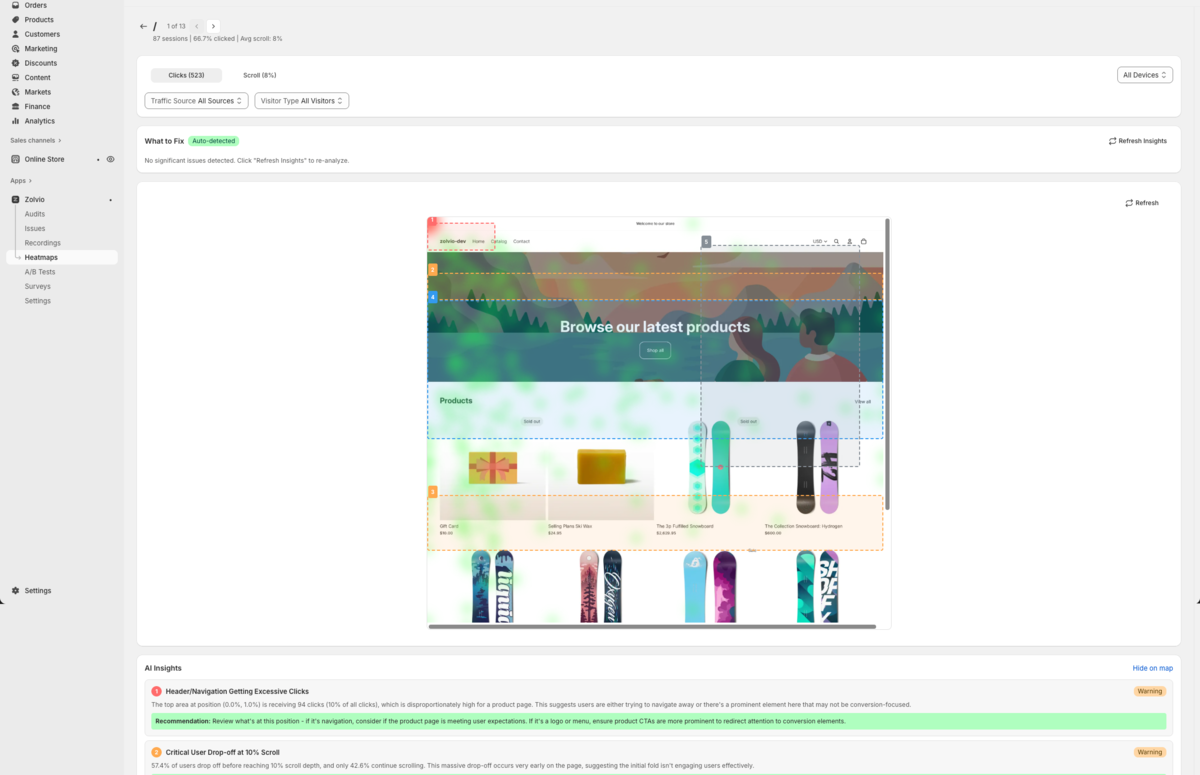
/docs-images/heatmaps/heatmap-overlay-1200x720.pngTypes of Heatmaps
Click Maps
Click maps show where visitors click on your pages. Hot spots (red/orange) indicate high click activity, while cold spots (blue/green) show areas with fewer clicks.
Scroll Depth
Scroll maps reveal how far down the page visitors scroll. This helps you understand:
- Where attention drops off
- If important content is being seen
- Optimal placement for CTAs
Viewing Heatmaps
- Go to Heatmaps in the sidebar
- Select a page from your store
- Choose the device type (desktop, tablet, or mobile)
- Toggle between click and scroll views
Page Limits
Heatmap page limits depend on your plan:
- Free: 1 page
- Starter: 25 pages
- Growth: Unlimited pages
- Pro: Unlimited pages
Data Requirements
Heatmaps become available once a page has enough interactions to be meaningful.
- Minimum to show “Ready”: 30 sessions and 50 clicks
- Recommended for confident decisions: 100+ sessions and 200+ clicks
- Segment by device: desktop and mobile behavior often differs
For details on accuracy, segmentation, and common pitfalls, see Data Quality.
For segmentation (visitor type, traffic source, UTMs, and A/B variants), see Heatmap segmentation.
How heatmaps relate to recordings
AI Insights
Zolvio can generate AI-powered suggestions from your heatmap patterns, including:
- Optimization recommendations based on click patterns
- Scroll behavior interpretation
- Comparison with conversion benchmarks
See AI Insights for quotas, rate limits, and how to interpret suggestions.
Screenshots
Heatmaps can be overlaid on a captured screenshot of your page for easier interpretation. See Screenshots.
Element Clicks
In addition to the visual overlay, Zolvio can summarize the most-clicked areas/elements to help you prioritize what to review first.
Troubleshooting
If a page isn't showing up, check thresholds and whether recording is enabled. See Troubleshooting.