Session Recordings: Privacy & Consent
Understand what’s captured, what’s masked, and how consent affects recording.
Consent Behavior (High Level)
- Recording should only start when visitor consent allows analytics recording (where required)
- Certain sensitive paths are excluded (for example: checkout/account-like routes)
- If consent is revoked mid-session, recording should stop and buffered data should be cleared
Screenshot placeholder
1200×650px •
/docs-images/recordings/consent-banner-1200x650.pngAdd a file at this path to replace the placeholder.
What Zolvio Masks and Excludes
Zolvio is designed to reduce PII risk:
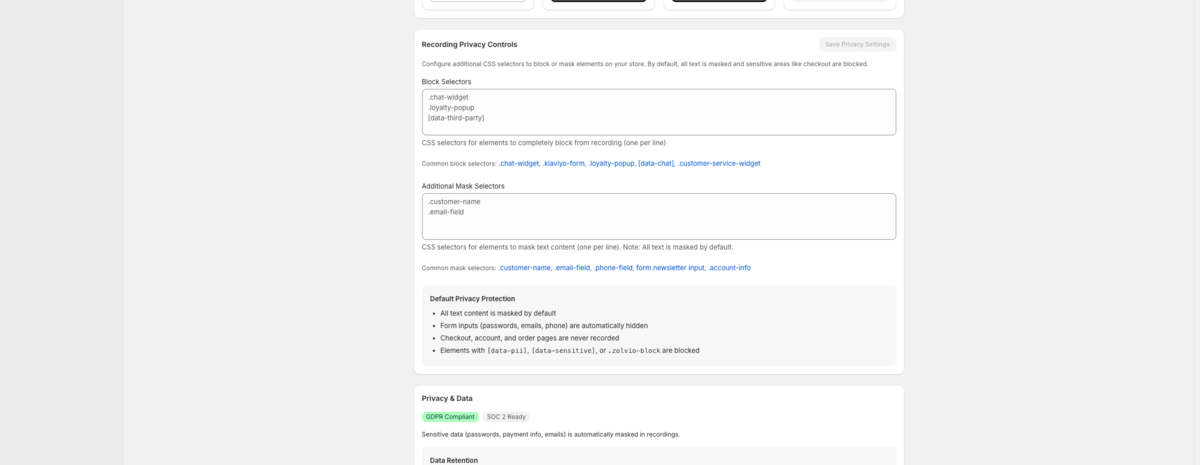
- Form input values are masked
- Sensitive elements can be blocked from recording
- Known sensitive paths are excluded from tracking
Important: compliance is shared
Zolvio can help you implement privacy-respecting analytics, but it can’t replace legal advice. You are responsible for obtaining any required consent and updating your storefront policies.
Marking Sensitive Areas (Developer Option)
If you have custom sensitive content on non-standard pages, you can mark elements to be excluded. A common pattern is adding a data attribute such as data-no-record (or similar) to a container element.
If you need help making theme-safe exclusions, contact your developer or reach out to Zolvio support.
What You Should Add to Your Store Policies
Your privacy policy should disclose session recording/analytics. For a practical checklist and suggested wording starting points, see Merchant Checklist.
Retention and Deletion
Retention depends on your plan and is enforced automatically. See Sampling & Retention and the Data Retention Policy.