A/B Testing
Ship controlled experiments on your storefront, measure impact, and roll out winners with confidence.
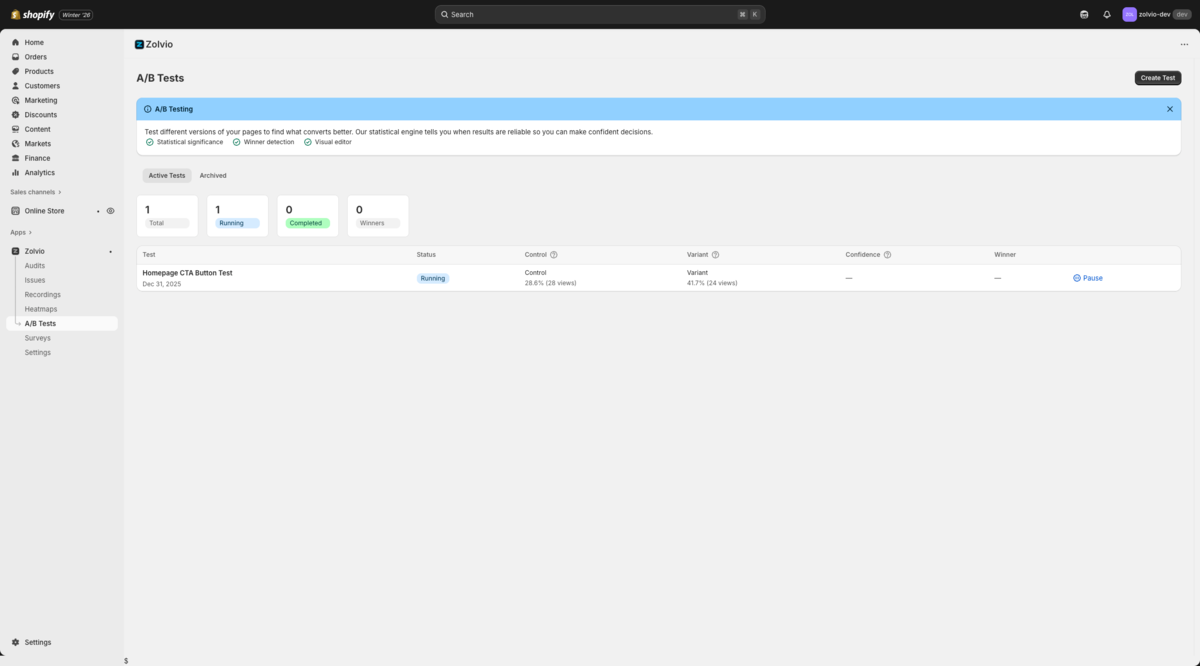
/docs-images/ab-testing/tests-list-1200x720.pngHow It Works (High Level)
- Zolvio assigns visitors to a variant and keeps that assignment consistent (“sticky”)
- An anti-flicker layer helps prevent a flash of original content while the variant applies
- Conversions are attributed based on exposure windows (e.g., add to cart, checkout, purchase)
Before you start
Creating a Test
- Go to A/B Tests in the sidebar
- Click Create Test
- Enter the URL of the page you want to test
- Use the visual editor to make changes to your variant
- Set your traffic allocation (e.g., 50/50 split)
- Define your goal (clicks, purchases, etc.)
- Start the test
For setup details and common Shopify theme gotchas, see Setup.
Visual Editor
The visual editor lets you make changes without code:
- Change text content
- Modify colors and styles
- Hide or show elements
- Swap images
Reading Results
Test results show:
- Visitors - Number of visitors in each variant
- Conversions - Goal completions per variant
- Conversion Rate - Percentage of visitors who converted
- Lift - Improvement over the control
- Confidence - Statistical certainty of the result
When you have enough volume, use heatmaps and recordings by variant to explain why a variant won (or why it didn’t). See Heatmaps & Recordings.
For conversion attribution windows and what “counts” as a conversion, see Goals & Attribution.
AI Insights (Optional)
Zolvio can generate a short, plain-English explanation of what happened in your test: winner narrative, data quality notes (SRM/delivery), key segments, and recommended next actions. This is optional and may be limited by your plan’s AI caps. See AI Usage & Controls.
When to Declare a Winner
We recommend declaring a winner when:
- Confidence level reaches 95% or higher
- You have at least 100 conversions per variant
- The test has run for at least 7 days (to account for weekly patterns)
Test Limits
- Free: No A/B testing
- Starter: 1 concurrent test
- Growth: 3 concurrent tests
- Pro: 10 concurrent tests
Anti-Flicker & Performance
Zolvio includes an anti-flicker mechanism to reduce visual flashing when applying variants. See Anti-Flicker.
Targeting
You can target tests by conditions like device type and UTM parameters. See Targeting.
Advanced Statistics
Zolvio includes advanced analysis views to help you make better decisions:
- Traditional confidence and lift (frequentist)
- Bayesian probability to beat control and expected loss
- Device and audience breakdowns
See Statistics for how to interpret these views.
QA & Troubleshooting
If variants aren't applying or pages flash, follow the QA checklist. See QA & Troubleshooting.