A/B Testing Setup
Enable the theme extension, verify variant application, and avoid common Shopify pitfalls.
Enable the Theme Extension
- In Shopify admin, go to Online Store → Themes
- Click Customize
- Open App embeds (or the equivalent for your theme)
- Enable Zolvio A/B Testing
- Save your theme
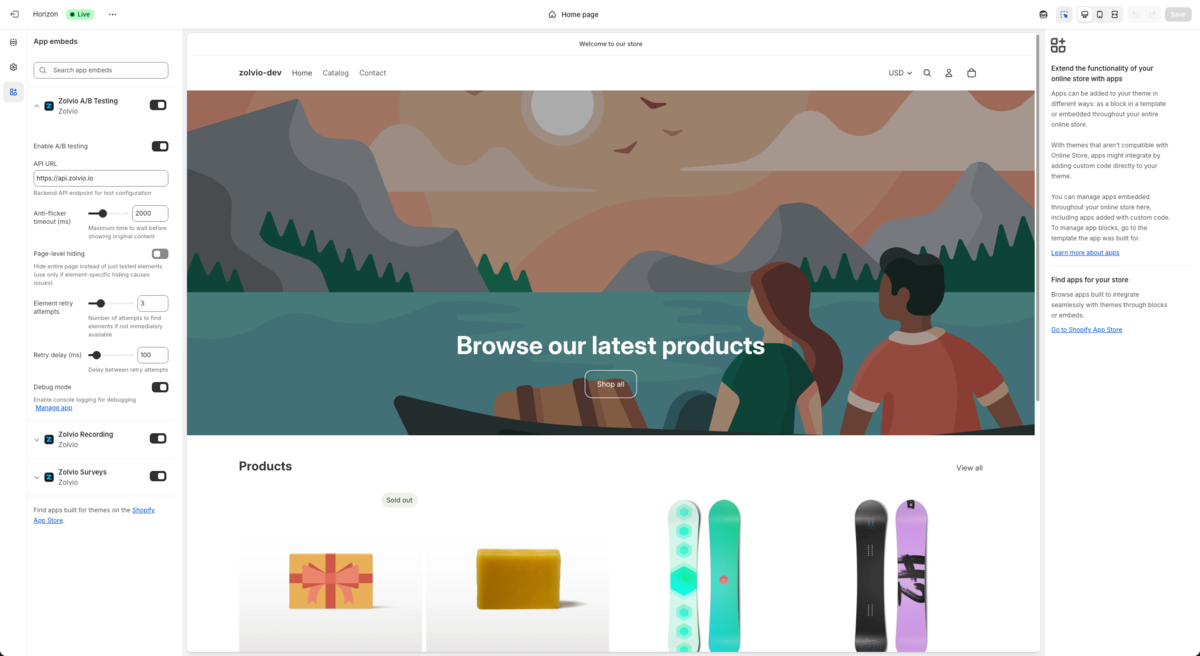
Screenshot placeholder
1200×750px •
/docs-images/ab-testing/theme-editor-ab-embed-1200x750.pngAdd a file at this path to replace the placeholder.
Create a Test Safely
- Start with a single, high-impact page (homepage or product page)
- Change one thing at a time (headline, CTA, price display, etc.)
- Run in theme preview first, then publish to production
Avoid overlapping tests on the same page
Multiple tests on the same elements can interfere and make results unreliable. If you must run overlapping tests, use a clear test plan and document interactions.
Consent and Exclusions
A/B testing should respect excluded paths (such as checkout-like routes). If your store requires consent, see Cookie & Consent.
Next
- Anti-Flicker: how the page avoids flashing
- Goals & Attribution: what counts as a conversion