Publishing a Winner
When a test has a clear result, click End test and Zolvio gives you three distinct actions—so “applying a winner” never accidentally stops it from being shown.
Your three options
- Roll out the winner — serve the winning variant to 100% of visitors through Zolvio. The experiment’s results are frozen, but delivery keeps running, so the winner stays live with no theme changes. This is the fastest way to ship a result.
- Make it permanent — get a copy-paste code snippet to add the change to your theme. Once it’s live on your storefront, end the experiment so Zolvio stops serving it (this avoids applying the change twice).
- End the experiment — stop serving and measuring, and finalize the results. Nothing further is changed by Zolvio.
When can I publish?
When a winner holds, it rolls out on its own
When a winner becomes decision-ready, Zolvio emails you (“is ready to roll out”). Roll it out yourself, or leave it: once the same winner has held for 3 days, Zolvio rolls it out to 100% of visitors, just as Roll out the winner does. The test stays live, so you can still make it permanent or roll it back. If the result stops being ready, or a different variant leads, the 3 days start over.
When a test’s page is too quiet to reach the visitors it needs within three months at the current pace, the test shows Unlikely to reach a result and Zolvio emails you once. End it and keep the version you prefer, or test a busier page.
Ending without a winner
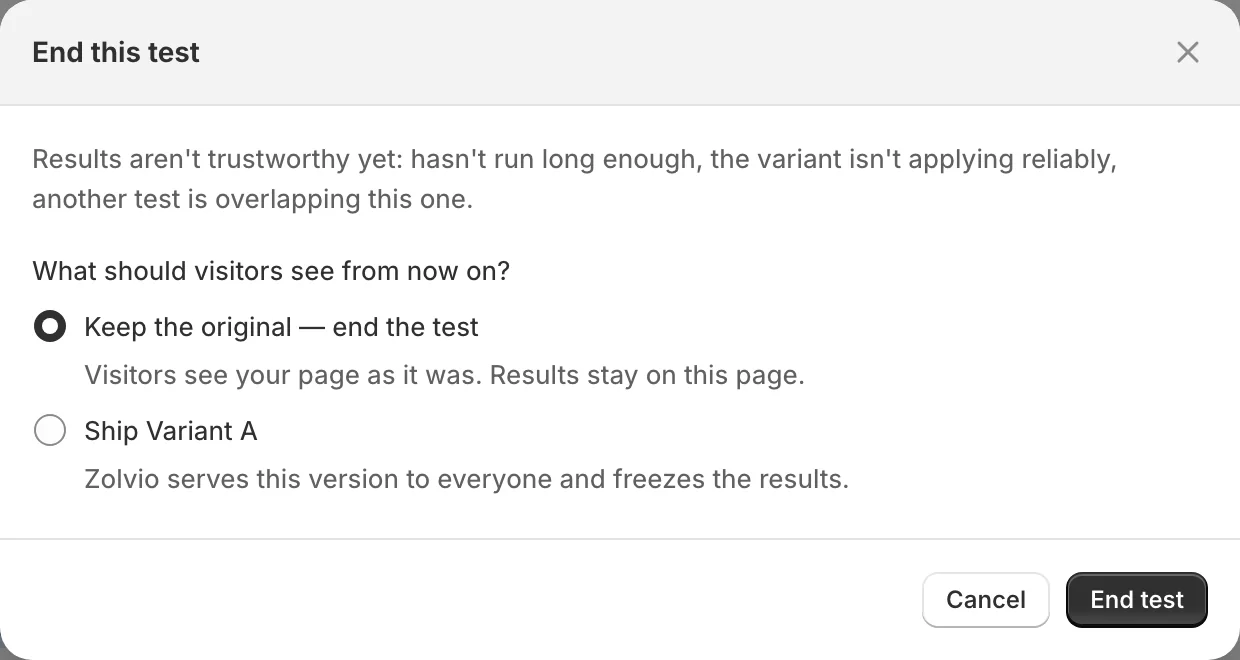
If there is no winner yet, End test asks whether to keep the original or ship one of the variants anyway. Pause stops the test without deciding. The emergency stop for every test at once lives in Settings → Emergency controls.
Rolling back
After you roll out a winner, Roll back in the test page’s ⋯ menu re-opens the experiment with an even traffic split. Once a test has ended, you can roll it back for 7 days. It can only undo what Zolvio serves:
- It restores Zolvio serving all variants again and re-opens the experiment.
- If you used Make it permanent and pasted the snippet into your theme, that change is still live in your theme—remove it there manually.
Split-URL tests
Publishing works the same way for split-URL tests (roll out keeps redirecting the winning share; end stops it).